
SurgePVSurgePV website, opens in a new tab

Meet SurgePV, solar design software built for solar professionals

One browser-based platform for the whole design workflow: site model, module layout, shading analysis, yield and financial simulation, and the client proposal. Built by the team behind Heaven Designs, for solar companies that design in-house.

SurgePV is a product of SurgePV Technologies Ltd, London. Heaven Designs introduces it here as a software partner.

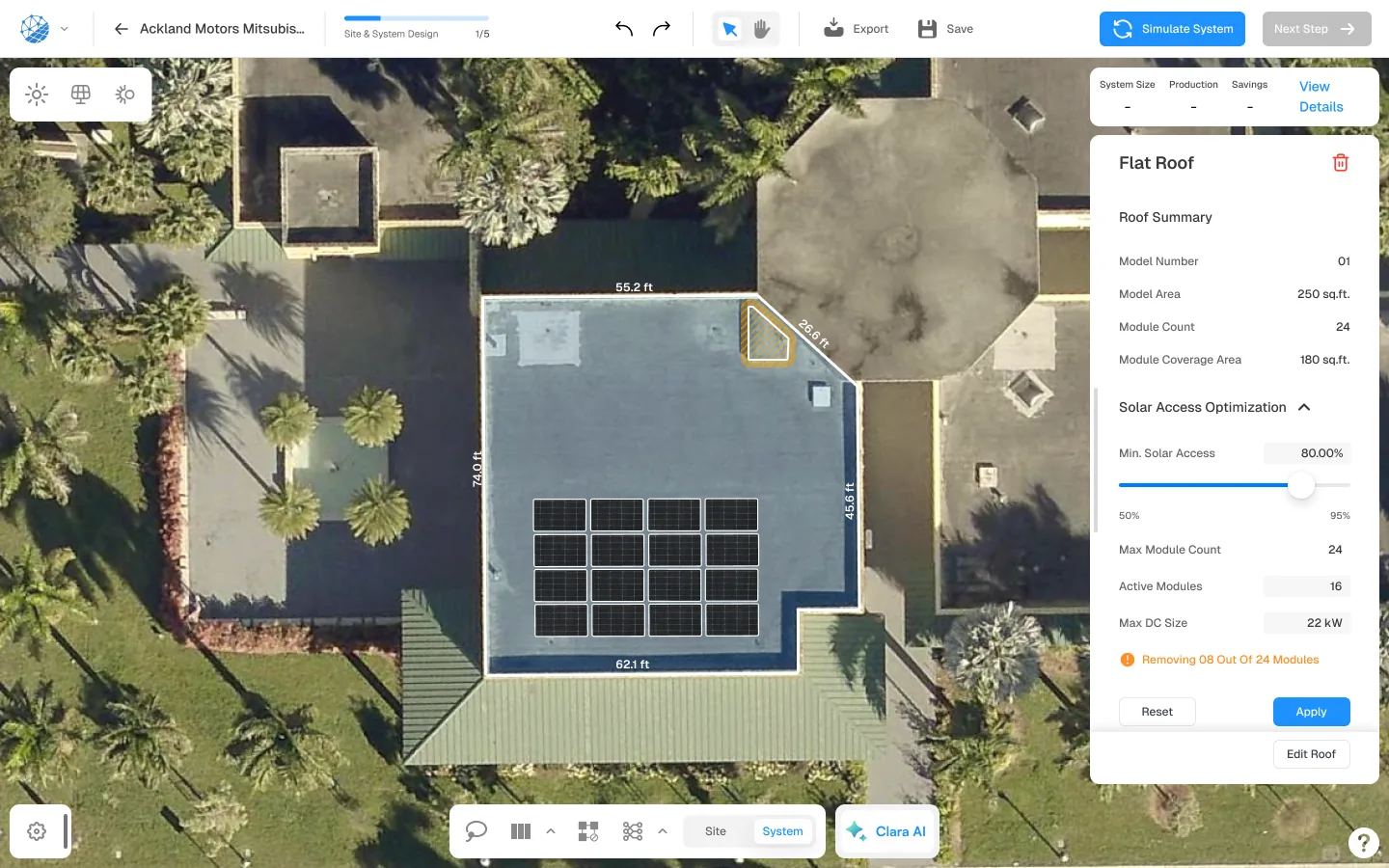
The SurgePV design workspace: a flat commercial roof traced from satellite imagery with 16 modules placed and the Solar Access Optimisation panel open on the right.
SurgePV, solar access optimisation on a flat-roof array.

The problem

A smarter way to design solar

Most solar teams do not have a design problem. They have a handoff problem. The layout lives in one tool, the yield in another, the financials in a spreadsheet and the proposal in a deck, and the only thing holding the four together is someone remembering to update all of them.

SurgePV closes that gap by keeping the whole sequence on one project. Site model, module layout, stringing, shading, yield, financials and the client document are steps in a single workflow rather than four files that have to be reconciled by hand.

Book a Demo

Five tools per project

A CAD package for the layout, a simulation engine for the yield, a spreadsheet for the financials and a slide deck for the client. None of them share a model.

The same data, keyed in four times

Module counts, tilt, azimuth and losses get retyped at every handoff. Each retype is a chance for the proposal to disagree with the design.

Revisions that restart the chain

A moved array or a swapped inverter means redoing the simulation, the financials and the document, in that order.

Shade found on site, not in the model

Obstructions missed at design stage turn into production shortfalls, redesigns and difficult conversations after the sale.

The product

SurgePVSurgePV website, opens in a new tab

What is SurgePV?

SurgePV is cloud-based solar design software for solar professionals. It runs in the browser, which means designs open on any machine and the team works on the same project rather than passing files around.

It is built for solar businesses: installers, EPCs, in-house design teams and the sales people who have to put a credible document in front of a customer. It is not a consumer tool, and it is not a CRM.

  • Cloud-based, so it runs in a browser with no desktop install
  • Five product areas: design, shading, generation and financials, proposals, and the Clara AI assistant
  • Marketed to installers and EPCs, from a solo designer to a 50-person team
  • Residential rooftops through commercial and utility-scale layouts
Visit SurgePV , opens in a new tab
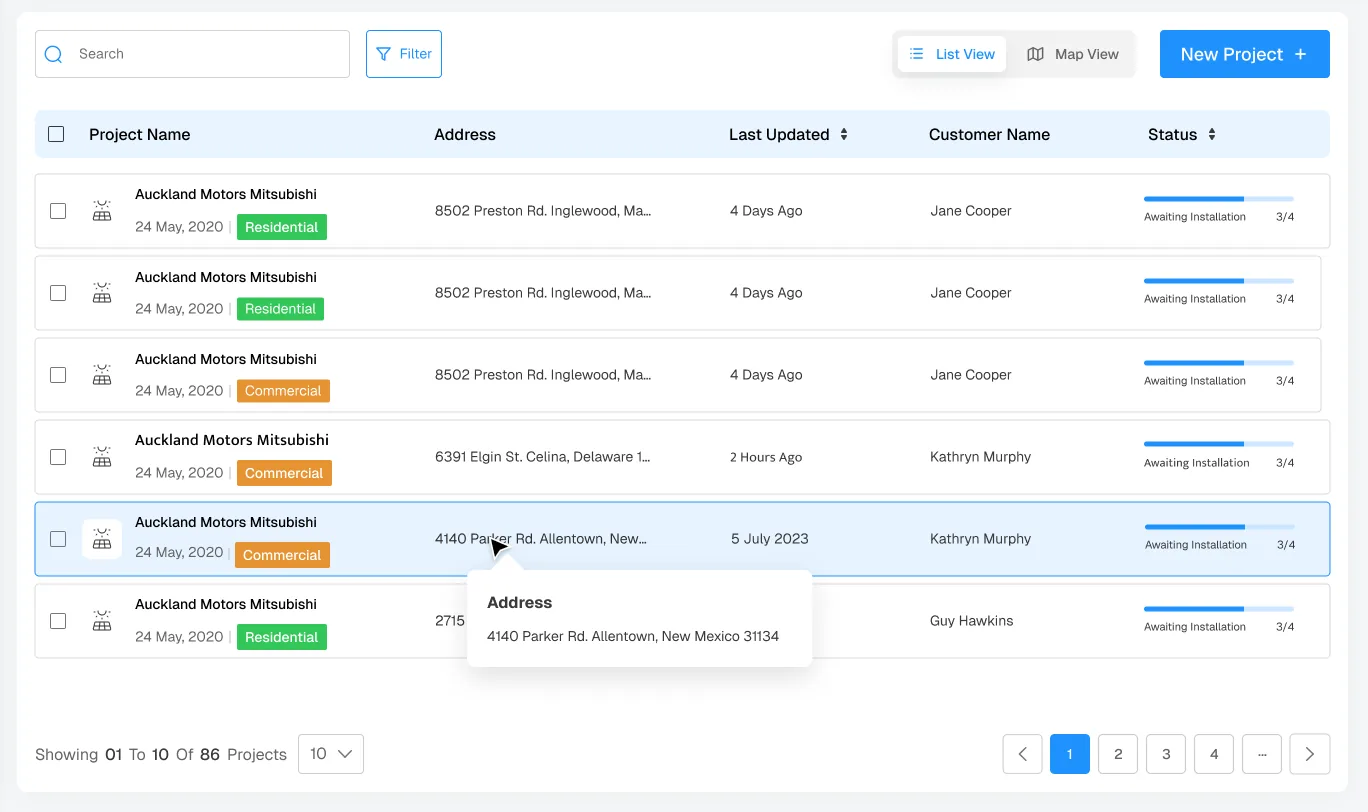
The SurgePV project list, showing solar projects with address, last updated date, customer name and an installation progress status for each.
Projects in SurgePV, with status carried across the design workflow.
Countries reached
18+ Countries reached
Projects created
70k+ Projects created
Core products
5 Core products
First version live
2025 First version live

Figures as published by SurgePV on its about page, opens in a new tab. Heaven Designs has not independently verified them.

Inside the platform

Five products, one project file

SurgePV markets five core product areas. They are steps in the same workflow, not separate purchases.

Solar Designing

Build the site model from an address. SurgePV generates a 3D roof from satellite imagery, then places modules across the planes you keep.

  • AI roof modelling from Google, Esri, Nearmap or Bing imagery
  • Dormers, multi-tilt planes and complex geometry
  • Automatic module placement, DC stringing and single-line diagrams
  • BOM and permit-ready output, plus DWG export for AutoCAD
Solar Designing on SurgePV , opens in a new tab

Shadow Analysis

Hourly shade and irradiance modelling over the site model, so obstructions show up in the layout rather than on the roof.

  • Hourly shading across the full year
  • Irradiance mapping from site-specific data
  • Solar-access thresholds that drive module placement
  • Shade report exported alongside the proposal
Shadow Analysis on SurgePV , opens in a new tab

Generation & Financial Tool

Yield simulation and financial modelling on the same design, with the assumptions written down next to the numbers.

  • P50, P75 and P90 yield scenarios
  • CAPEX, LCOE, NPV, IRR and payback period
  • Loss analysis split by shading, wiring and inverter clipping
  • Documented assumptions attached to every run
Generation & Financial Tool on SurgePV , opens in a new tab

Solar Proposals

Client-facing proposals generated from the design that produced them, so the numbers in the document match the model.

  • Branded templates with bilingual output
  • Consumption profiling, before and after solar
  • PPA, lease and loan financing structures
  • Document proposal and shade report exported together
Solar Proposals on SurgePV , opens in a new tab

Clara AI

A solar-trained assistant inside the project rather than a general-purpose chatbot. It reads the design and answers against it.

  • Layout optimisation against roof geometry, shading and energy targets
  • NEC, IEC and local code lookups before submission
  • System sizing and inverter pairing suggestions
  • BOM, stringing calculations and report formatting
Clara AI on SurgePV , opens in a new tab

See it on your own project

The fastest way to judge any of this is to watch a site you already know get modelled, simulated and turned into a proposal.

Book a Demo

Walkthrough

From address to signed proposal

Site model

The roof is modelled before a module is placed

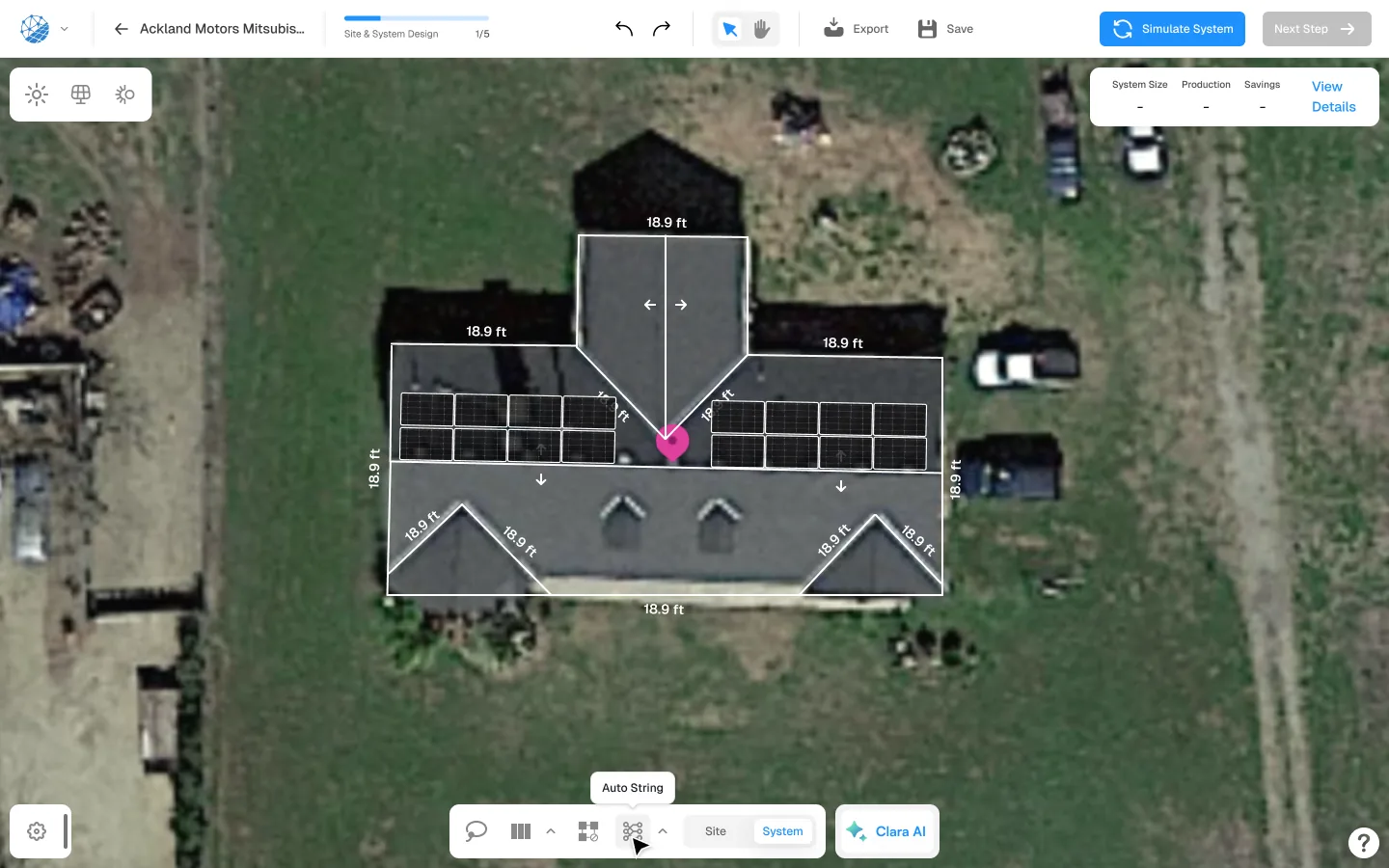
SurgePV builds the 3D roof from satellite imagery for the address, keeping separate planes for each pitch and azimuth. Dormers, setbacks and obstructions are traced in the same view, so the layout that follows is constrained by the actual roof rather than an approximation of it.

A pitched residential roof in SurgePV, traced into separate roof planes with edge dimensions labelled and two module arrays placed.

Electrical

Stringing and inverters live in the same model

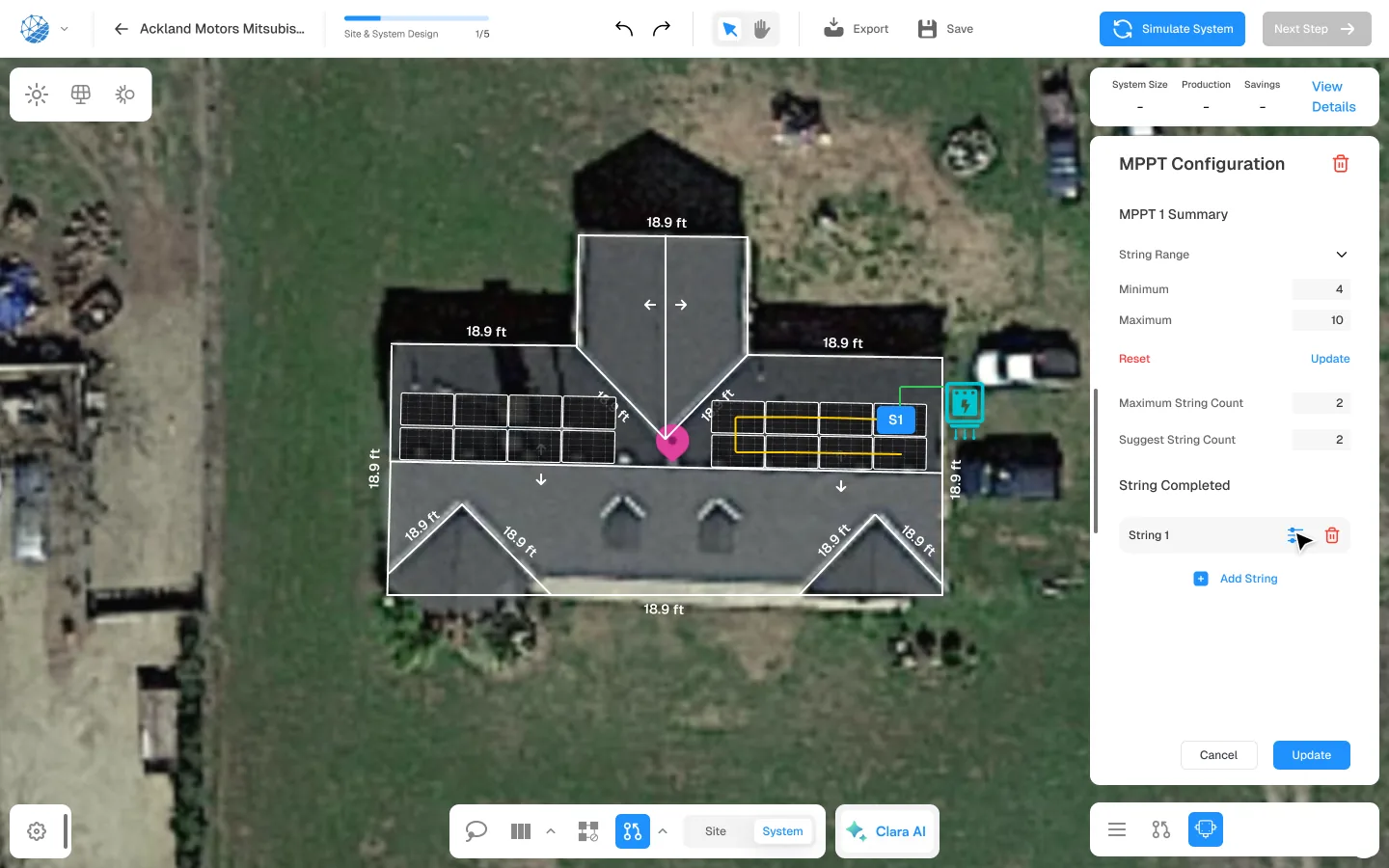
DC stringing runs against the array you designed, with MPPT ranges, string counts and inverter selection resolved in place. Because the electrical design and the geometry share one model, a moved array does not silently invalidate the stringing.

The MPPT configuration panel in SurgePV showing string range, maximum string count and a completed string on a roof array.

Simulation & finance

Yield and financials read from the design, not a spreadsheet

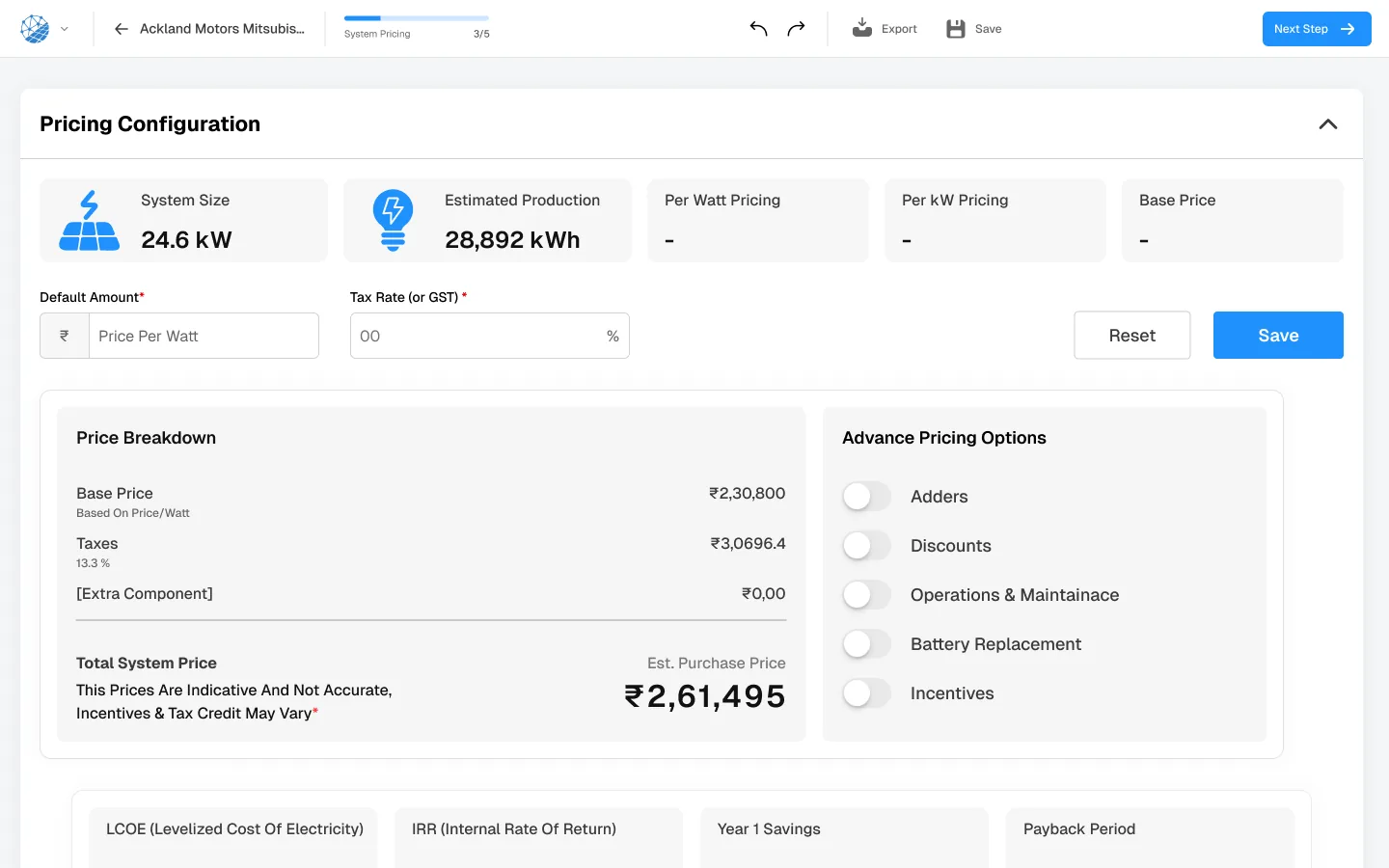
System size and estimated production carry straight into pricing, LCOE, IRR, first-year savings and payback. Change the layout and the financial case updates with it, which removes the most common reason a proposal disagrees with the design behind it.

SurgePV pricing configuration screen showing system size, estimated production, a price breakdown with taxes, and LCOE, IRR, first-year savings and payback period fields.

Proposal

The client document is an output, not a rebuild

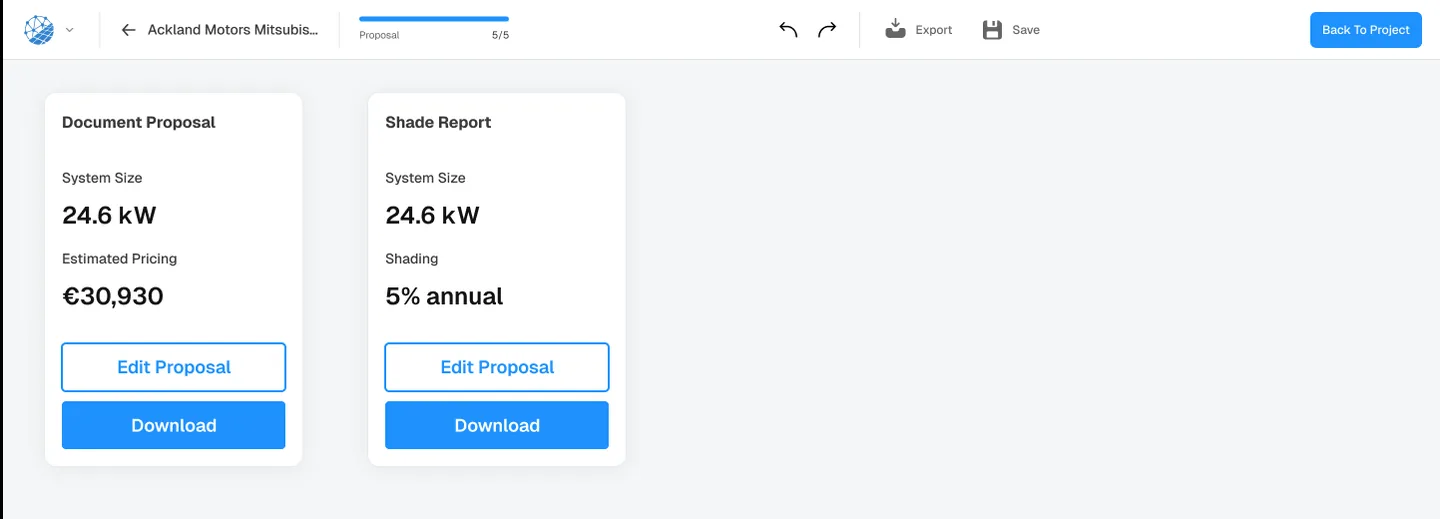
The proposal and the shade report are generated from the project that produced them, branded and ready to send. Nothing is retyped into a deck, so the system size, shading figure and price in front of the customer are the ones in the model.

SurgePV proposal step showing a document proposal card and a shade report card, each with system size, headline figure and a download button.

Who it is for

Built for solar professionals

SurgePV sells to solar businesses, not to homeowners. These are the groups it markets to directly.

Solar installers & EPCs

The primary audience — teams that design systems and issue proposals, from a solo designer to a 50-person EPC.

Read more about Solar installers & EPCs on the SurgePV website, opens in a new tab

Solar sales professionals

Reps who need an accurate layout and a branded proposal while they are still in front of the customer.

Read more about Solar sales professionals on the SurgePV website, opens in a new tab

Channel managers & OEMs

Manufacturers and distributors standardising how design is done across a partner network.

Read more about Channel managers & OEMs on the SurgePV website, opens in a new tab

Residential teams

Rooftop work where turnaround and a homeowner-ready document decide the deal.

Read more about Residential teams on the SurgePV website, opens in a new tab

Commercial & C&I developers

Larger rooftops and C&I portfolios that need bankable yield scenarios and IRR alongside the layout.

Read more about Commercial & C&I developers on the SurgePV website, opens in a new tab

Utility-scale designers

Ground-mount and utility-scale layouts, which SurgePV markets on a dedicated page.

Read more about Utility-scale designers on the SurgePV website, opens in a new tab

Services and software

Professional solar expertise meets solar design technology

The two are separate businesses with a shared origin. SurgePV's about page states that it was founded by the team behind Heaven Designs, and that Keyur Rakholiya, founder of Heaven Designs, is its CEO and co-founder. Heaven Designs does not own or resell SurgePV.

Heaven Designs

Design and engineering, delivered

You send the project, our engineers produce the package. This is the right route when the work needs stamped or constructible output, structural calculations, or a permit set that will be reviewed by an AHJ.

View all Heaven Designs services

Plenty of teams use both: the software for volume design work they keep in-house, an engineering partner for the packages that need a stamp, a structural report or a reviewer's approval.

Why solar teams move design into software

One model, one set of numbers

When the layout, the simulation and the proposal share a project file, a revision propagates instead of starting a chain of manual updates.

Constraints caught at design stage

Shading, solar access thresholds and string limits are applied while the design is still on screen, which is considerably cheaper than finding them on a roof.

Design capacity that scales with the pipeline

A repeatable workflow lets a small team take on more projects without every design routing through the one person who knows the CAD file.

FAQ

SurgePV, frequently asked questions

What is SurgePV?
SurgePV is cloud-based solar design software for solar professionals. It runs in the browser and covers site modelling, module layout, shading analysis, energy and financial simulation, and client proposals in one platform, instead of splitting that work across a CAD tool, a simulation engine, a spreadsheet and a slide deck.
Is SurgePV part of Heaven Designs?
No. SurgePV is a separate company, SurgePV Technologies Ltd, headquartered in London. SurgePV's about page states that it was founded by the team behind Heaven Designs, and that Keyur Rakholiya, founder of Heaven Designs, is its CEO and co-founder. The two businesses are run separately: Heaven Designs provides design and engineering services, SurgePV sells software.
Do I have to choose between SurgePV and Heaven Designs?
No, and most teams do not. SurgePV is the right fit when you want your own people designing in-house on a single platform. Heaven Designs is the right fit when you need stamped or constructible deliverables, structural calculations, permit packages or overflow capacity. Teams often use both — software for volume work, an engineering partner for the packages that need sign-off.
Who is SurgePV built for?
SurgePV markets itself to solar installers and EPCs first, then to solar designers, sales teams, project and operations managers, and to manufacturers, OEMs and channel managers standardising design across a partner network. It covers residential rooftops through commercial and utility-scale layouts. It is not sold to homeowners.
What happens after I book a demo?
The SurgePV team gets in touch to arrange a walkthrough of the platform against your own project, inputs and acceptance criteria. Requesting a demo does not commit you to anything, and a demonstration does not promise a particular time saving, permit approval or commercial outcome.
Where can I see pricing?
SurgePV publishes per-user subscription pricing on its own pricing page. Because those figures and the terms attached to them change, we do not restate them here — check surgepv.com/pricing and confirm feature scope, limits, taxes and contract terms with the SurgePV team.
SurgePVSurgePV website, opens in a new tab

Solar design software for modern solar businesses

Design, simulation, financials and proposals on one cloud platform. Look around the product site, or have the SurgePV team walk you through it on a project of your own.

Book a demo

See SurgePV in action

Book a personalised demo and see how SurgePV fits your solar design workflow. Bring a real project and review the design, simulation, financial and proposal steps against your own inputs and acceptance criteria.

  • A walkthrough of the platform, not a slide deck
  • Model one of your own sites during the session
  • Ask about codes, exports and the tools you already run

Request your SurgePV demo

Takes about 30 seconds. The SurgePV team follows up to schedule the session.

No commitment required. A demonstration does not promise a particular time saving, approval or commercial outcome. Your details are shared with SurgePV so they can arrange the session. By submitting you agree to our Privacy Policy.